
@druxt-contrib/node-preview




Node Preview module for Druxt
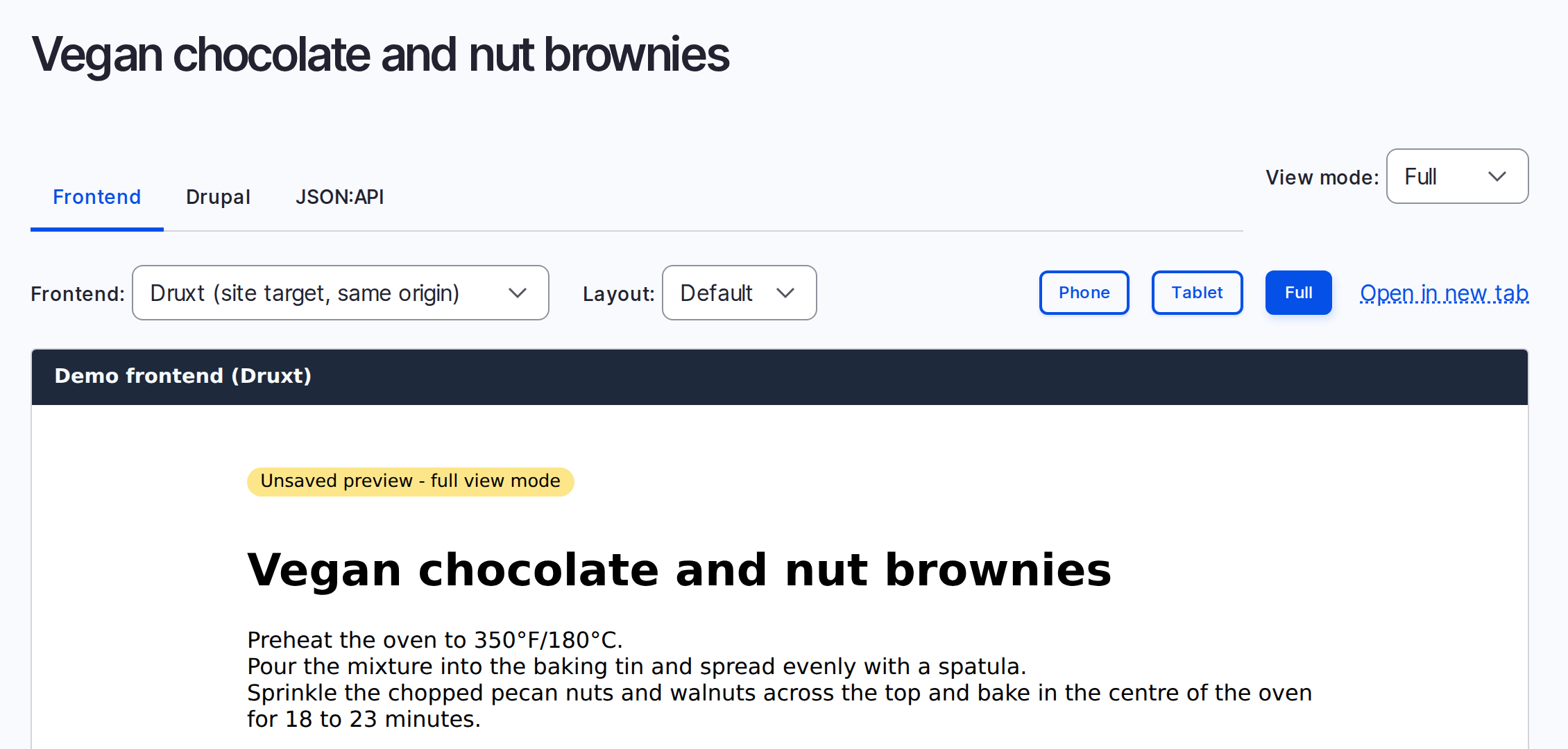
Shows an unsaved Drupal node in your Druxt frontend. The editor presses Preview in Drupal and sees the node as the live site will show it, paragraphs included.
Features
- Renders the unsaved node with the site's own Druxt components.
- Includes unsaved paragraphs, and with
include, the media they reference. - Lets the editor pick a Nuxt layout, such as a bare one for embedded content.
- Wraps the preview in a component of your own, for a title or a container.
- Reads the preview with a Simple OAuth token on a frontend on another domain.
- Can add its own preview target to Drupal each time Nuxt starts up.
- Keeps the preview page out of shared caches and search engines.
How it works
- The editor presses Preview in Drupal. The Frontend tab of Consumer Node Preview opens this module's page in a frame.
- The page reads the preview's JSON:API address from the part of its URL
after the
#. Browsers do not send that part to the frontend's server. - The page fetches the preview, from JSON:API Node Preview, with the editor's Drupal session, or with a token from the URL for a frontend on another domain. It puts the document in the Druxt store.
DruxtEntityrenders the node from the store. The unsaved content goes through the same components as the live site.
Requirements
- Nuxt 2, with Druxt 0.25 and Druxt Entity 0.29 or later, through
druxt-site0.15. - Node 16.20.1 or a later Node 16 for the build. Druxt's schema build fails on newer Node.
- Drupal 10.3 or 11, with Consumer Node Preview and JSON:API Node Preview. See Consumer Node Preview's requirements for the JSON:API Node Preview fixes it needs.
- The frontend and Drupal on one parent domain, such as
www.example.comandcms.example.com. Otherwise, see Previews with a token.
Quick start
On the frontend:
npm install druxt-site @druxt-contrib/node-preview
// nuxt.config.js
export default {
  modules: ['@druxt-contrib/node-preview', 'druxt-site'],
  druxt: {
    baseUrl: 'https://cms.example.com',
  },
}
A site without druxt-site lists druxt-entity in modules instead.
On Drupal:
-
Install the modules:
composer require drupal/jsonapi_node_preview:^1.0@beta drupal/consumer_node_preview
drush en consumer_node_preview
An editor who can edit a node can preview it, as with Drupal's own Preview button. Their role also needs View published content, because JSON:API checks it before it shows a node.
-
Go to Administration > Configuration > Web services > Consumers, and add or edit the frontend's consumer. Under Preview targets, add a label and this URL, with your frontend's host:
https://www.example.com/druxt/node/preview?vm=[view_mode]#[jsonapi_node_preview_path]Drupal fills in the parts in square brackets when the editor presses Preview. Keep them as they are. The frontend can also add this target itself. See Automatic registration.
-
Allow the frontend's origin, with credentials, in the CORS settings in
services.yml. Consumer Node Preview's configuration has the YAML. -
Let Drupal show the preview page in a frame. Nuxt doesn't send frame headers by default. If your host or a module adds
X-Frame-Optionsor aContent-Security-Policy, exempt the preview path, and add Drupal's origin toframe-ancestors.
To check it, edit a node, change something and press Preview. The Frontend tab shows the change.
Options
All options are optional, and go under druxt.nodePreview.
| Option | Default | Description |
|---|---|---|
path | '/druxt/node/preview' | The preview page's path. |
include | [] | Relationships to add to the preview request. Key them by type when only some bundles have them. |
origins | [] | More origins the preview may come from, as full URLs. |
layouts | [] | Nuxt layouts the preview may use. See Layouts and theming. |
register | false | Adds the frontend's preview target to Drupal on start up. See Automatic registration. |
include. Consumer Node Preview already includes a node's paragraphs, three
levels deep. Add
what the paragraphs reference, such as field_content.field_media. JSON:API
refuses a path that the previewed type does not have, so key it by type when
only some bundles have it:
include: { 'node--page': ['field_content.field_media'] }
origins. Any link can put an address in the page's URL. So the page only
fetches from its own origin, druxt.baseUrl, a register backend, and
origins. List each as a full URL, such as https://cms.example.com. The
preview request says which of them the Druxt client
fetches from.
A value the module cannot use shows a warning in the build output, and the module ignores it.
For editors
Edit a node, change something and press Preview. Drupal opens its preview screen. The Frontend tab shows the node as the live site will, with your changes. The preview screen can also offer a view mode, a layout and a device width.
- The tab stays on "Loading preview...". Clear the browser's cache for the frontend, then press Preview again.
- The tab shows "Preview unavailable". Send the message under it to your site builder.
- "The preview token has expired. Press Preview in Drupal again." The preview was open too long. Press Preview again.
Troubleshooting
These are the commonest problems. Troubleshooting lists every message the module shows.
- The Frontend tab stays blank. The frontend refused the frame. Step 4 of the Quick start has the fix.
- "Preview request failed with HTTP 404 for ...". Drupal has no preview of
this node for the editor. Check that the editor pressed Preview. Without a
token, check that the frontend and Drupal share a parent domain. On your own computer, use one
host name for both:
localhostand127.0.0.1count as different. Then check the CORS settings. - "The preview endpoint is not on this site or its Drupal site: ...". Add
the preview's origin to the
originsoption. - "The URL fragment has no preview endpoint." Put
[jsonapi_node_preview_path]or[jsonapi_node_preview]after the#in the target URL. Use[jsonapi_node_preview]for a Drupal site other thandruxt.baseUrl.
More documentation
These pages are also published as a documentation site.
- Automatic registration, and its Drupal setup
- Layouts and theming
- The preview request, including previews with a token
- Troubleshooting
- Writing another frontend
The example pairs a Drupal site and a Nuxt site.
Licence
MIT.
It runs on StackBlitz, in a tab of its own.